macOS Quick Action
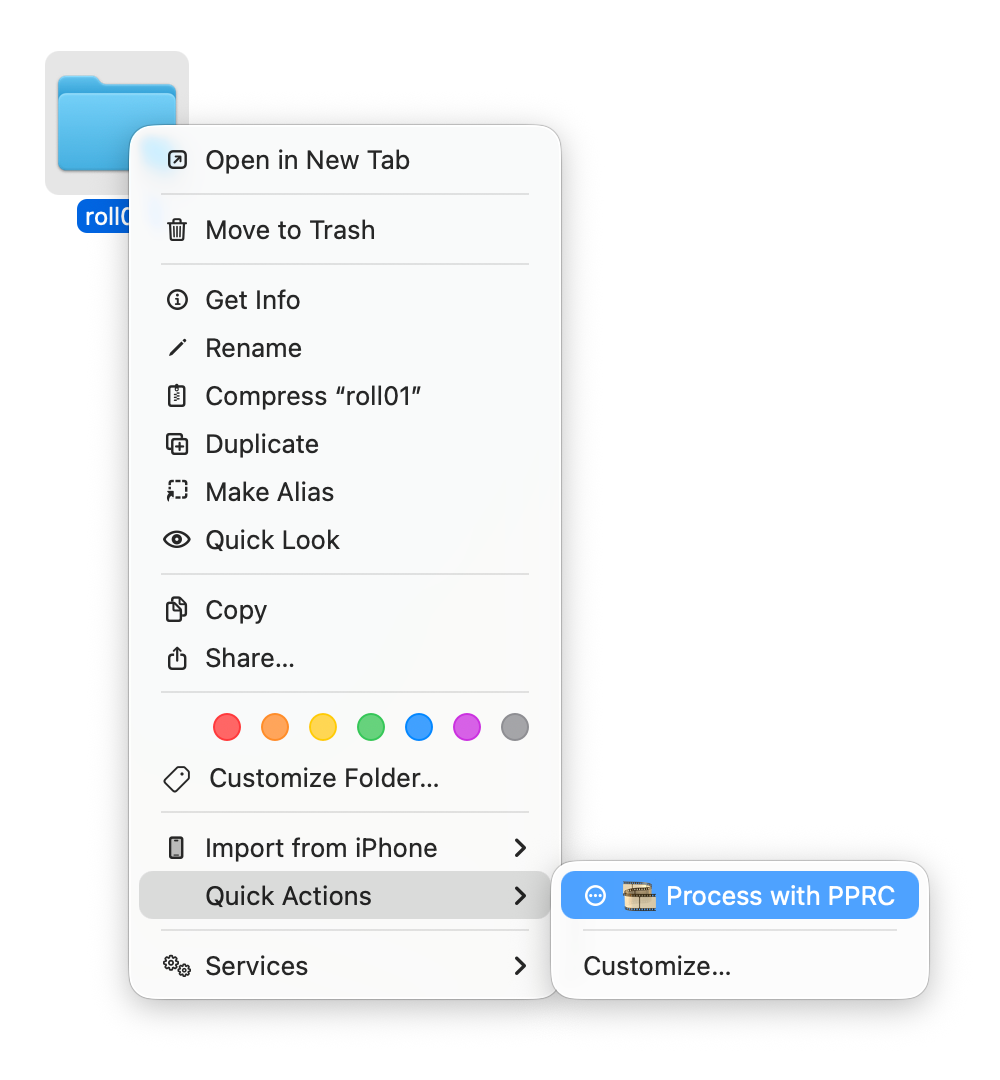
PPRC includes a Finder Quick Action that lets you right-click any folder of raw files and select “Process with PPRC”, no terminal needed.
Install
pprc --install-quick-actionThis generates and installs an Automator workflow to ~/Library/Services/. A Terminal window will open showing PPRC’s progress when you use the action.
Enable in Finder
After installing, you may need to enable the extension in System Settings:
macOS Tahoe (26+)
System Settings → General → Login Items & Extensions → Extensions → By Category → Finder, then click the Info (ⓘ) icon
macOS Sequoia (15)
System Settings → General → Login Items & Extensions → Extensions → Finder
macOS Ventura / Sonoma (13–14)
System Settings → Privacy & Security → Extensions → Finder
macOS Monterey and older
System Preferences → Extensions → Finder
Usage
- Right-click a folder containing
.rawfiles in Finder - Select Quick Actions → Process with PPRC
- A Terminal window opens showing progress
- Processed TIFFs appear in the output directory
Uninstall
pprc --uninstall-quick-actionHow it works
The Quick Action is an Automator .workflow bundle that runs a shell script. It opens Terminal and sources your shell profile so that the pprc command is available without hardcoded paths. Your global config settings are respected automatically.